Manual

Manual
  • Svenska
  • Menu Menu

Different logins and in which services they are used

Updated:2025-12-15|Published:2022-07-27

It is not always easy to know which login should be used for which service.
Here we have collected the different login types that exist, how they should be used and in which services.

The different login types described on the page are:

  • ADFS
  • Microsoft
  • SSO
  • UMU-id
  • UMU mail
  • Adobe
  • SWAMID
ADFS

ADFS

Originally used to sign in to Microsoft services. Now it is used for most logins to services where login was previously via CAS.

Usually, @ad.umu.se is automatically added to the username on pages/links coming from UMU. Microsoft uses, for example, @ad.umu.se to link to our login.

Microsoft

Microsoft

Some people have problems logging into Microsoft services.

For example; if you click on external link to an Microsoft’s online services without already being logged in, or if you try to log in to a Microsoft service without going through Umu, you most likely need to add @ad.umu.se to you Umu-id.

Example

Umu ID: abcd1234
Username at Microsoft then needs to be: abcd1234@ad.umu.se

SSO - Single Sign On

SSO – Single Sign On

SSO is something that many services refer to when logging in and can be confusing for the user. There is no standard for what the user must enter when logging in with SSO, but you need to check the instructions for each service. Usually it is enough to add umu.

Log in to Zoom with SSO

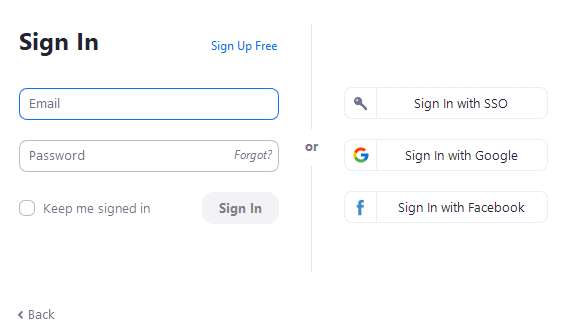
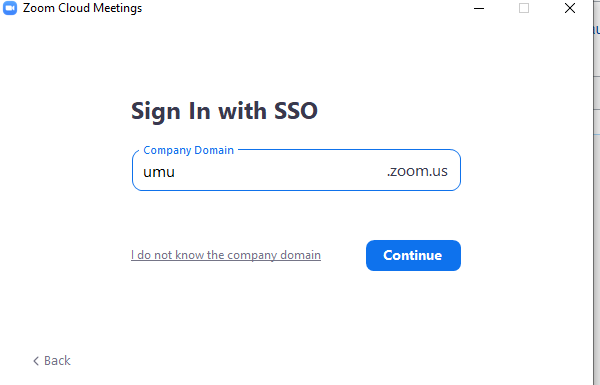
Zoom is an example where SSO is used. Many people try to log in with their e-mail address, but it is enough to enter umu in the login box at SSO.

  1. When logging in to Zoom, click Sign in with SSO

    Logga in i Zoom
  2. Type umu in the box
    Logga in via SSO
  3. Click Continue.
UMU-id

UMU-id

The username is used to log in to services within UMU. UMU’s pages and services managed by us shall only require the user to enter their UMU-id for login, not UMU-id@ad.umu.se.

UMU mail

UMU mail

Mostly used when configuring e-mail in, for example, a computer, mobile phone and tablet. No service uses UMU mail for login.

Adobe

Adobe

Adobe uses UMU-id@umu.se to link to UMU.

SWAMID

SWAMID

SWAMID is an identity federation that includes most universities, research institutes and other authorities related to the Swedish research and education sector.
It is, for example, used for logging into Ladok. SWAMID is managed by SUNET.

Do you still need help?

Click here to contact Servicedesk!

Contact ITS Service Desk

Create a support ticket at www.umu.se/servicedesk, call 090-786 63 00 or visit us next to Infocenter.

Kategorier

Scroll to top Scroll to top Scroll to top