
Manual

Manual
  • Svenska
  • Menu Menu

Find your shared files in OneDrive

Updated: 2026-05-26/in Employee, English, OneDrive /by Oscar Lundberg

In this manual, we’ll show you how to find the files you share with others through OneDrive, as well as which files are shared to you to your OneDrive.

  1. Go to www.m365.umu.se and log in with your UMU ID.
  2. In the search box, type OneDrive and klick on OneDrive.
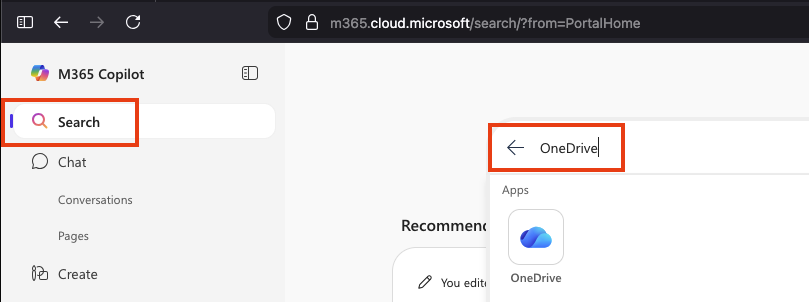
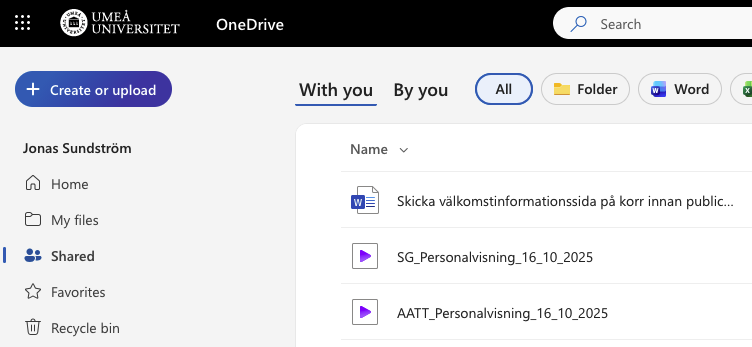
  3. In the left menu, click Shared.
  4. At first you are in the With you – Here you will see files/folders that others share with you.
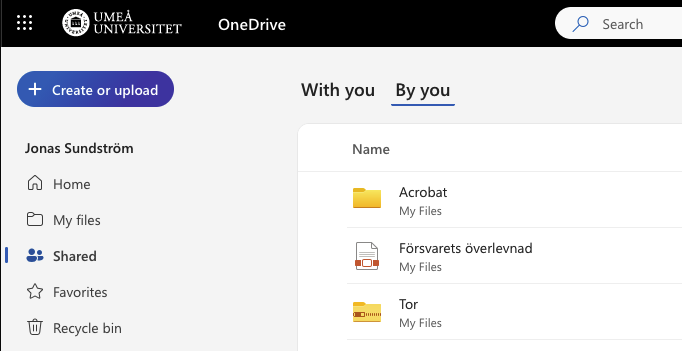
  5. Select By you – Here you will see files/folders that you share with others.
https://manual.umu.se/wp-content/uploads/2018/02/manual-loggo.png 0 0 Oscar Lundberg https://manual.umu.se/wp-content/uploads/2018/02/manual-loggo.png Oscar Lundberg2022-02-28 10:17:592026-05-26 09:27:34Find your shared files in OneDrive

Contact ITS Service Desk

Create a support ticket at www.umu.se/servicedesk, call 090-786 63 00 or visit us next to Infocenter.

Kategorier

Scroll to top Scroll to top Scroll to top