
Manual

Manual
  • Svenska
  • Menu Menu

Make a branch in Forms

Updated: 2025-12-16/in Employee, Forms, Microsoft 365, Okategoriserade, Student /by Maja Wik

When you create your forms and tests, you can choose to branch questions. This means that the current questions belongs or depends on another questions in the quiz.

  1. Open the form where you want to make a branch.
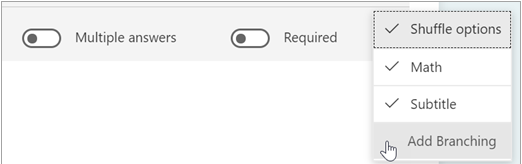
  2. Choose the questions that you want to branch, click on the three little dots and then Add Branching.
  3. Click on the arrow. In de accordion menu that pops up, choose which question you want to branch the question with.
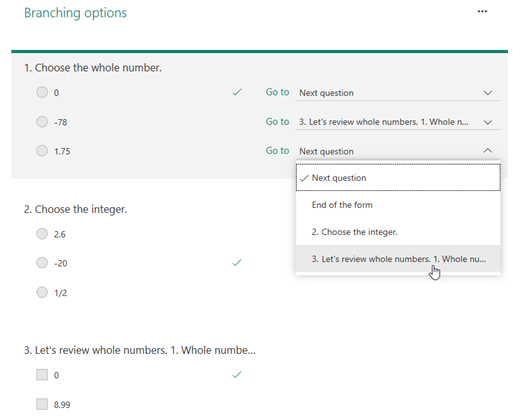
  4. When you’ve chosen, click on Back to keep editing other question or to finish.
https://manual.umu.se/wp-content/uploads/2018/02/manual-loggo.png 0 0 Maja Wik https://manual.umu.se/wp-content/uploads/2018/02/manual-loggo.png Maja Wik2021-11-09 12:21:572025-12-16 13:28:44Make a branch in Forms

Contact ITS Service Desk

Create a support ticket at www.umu.se/servicedesk, call 090-786 63 00 or visit us next to Infocenter.

Kategorier

Related links

  • Make a spontaneous poll with Forms in a Teams meeting
  • Review results in Forms
  • Adjust setting in Forms
  • Copy, delete or move a form or quiz in Forms
Scroll to top Scroll to top Scroll to top