
Alternative log in methods to Ladok for students
The purpose of this manual is intended for current and former students at Umeå University who do not have a Swedish personal identity number. It explains how to connect an alternative login method to Ladok for Students. Doing so allows you to continue accessing Ladok for Students even after your Umeå University student account becomes deactivated (normally two years after completing your studies).
You must set up this connection before your Umeå University student account is deactivated. You can use one of the following login methods:
- European eID (eIDAS): If you have an eID issued in an EU country other than Sweden, you can use it as an alternative login method.
- Freja for foreign nationals: If you have an international passport with NFC, you can create a Swedish eID via Freja and use it as an alternative login method. Create an account at: https://frejaeid.com/.Instructions follow below. You can also choose to use a recorded instruction in English.
Do the following:
1. Log in to Ladok for Students using your Umu-ID.
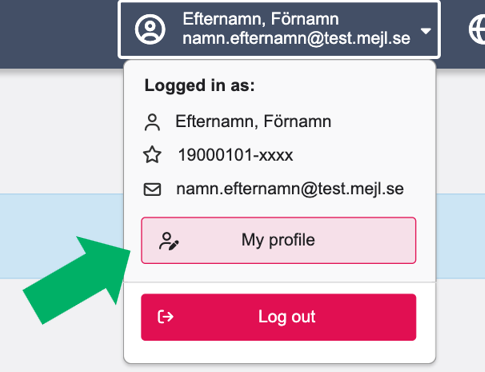
2. Click your name at the top of the menu and select My profile.
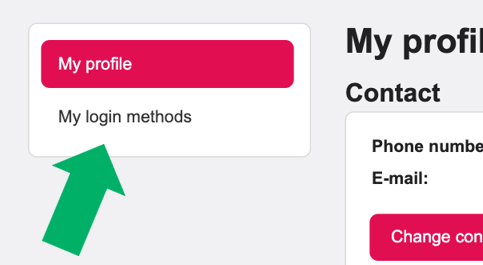
3. Select My login methods in the menu on the left.
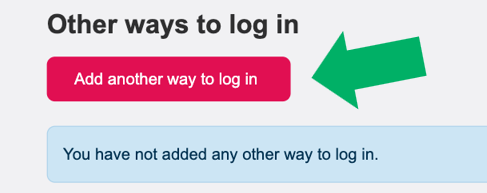
4. Click Add another way to log in.
5. Choose a login method: eIDAS or Freja.
6. Follow the instructions for the selected method and complete the authentication.
7. Once you have authenticated, you will return to Ladok. Your new login method will be listed under Other ways to log in.
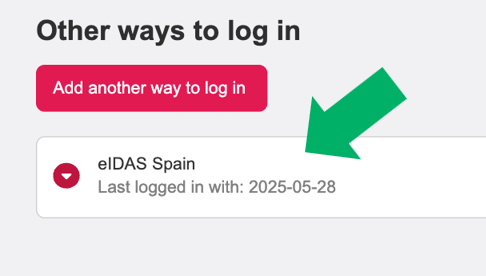
The next time you log in, you can use the login method you just connected to Ladok.
You may add an additional login method if you wish.