
Manual

Manual
  • Svenska
  • Menu Menu

Run-time error 53 on Office 365 for Mac

2024-02-09/in Adobe, English, Mac, Microsoft 365

Every time that I open either Word or PowerPoint, I get the Run-time error ’53
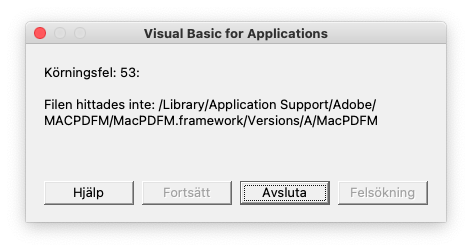
Word

  1. Open Word
  2. Go to the menu Tools -> Templates and Add-ins…
  3. Under Global Templates and Add-ins, remove the item linkCreation.dotm
  4. Close Word application
  5. Go to /Users/your-user-name-here/Library/Group Containers/UBF8T346G9.Office/User Content/Startup/Word/
  6. Remove linkCreation.dotm
  7. Restart Word and problem should go away.

PowerPoint

  1. Go to /Users/your-user-name-here/Library/Group Containers/UBF8T346G9.Office/User Content/Startup/PowerPoint/
  2. Remove SaveAsAdobePDF.ppam
  3. Launch PowerPoint
  4. Go to the menu Tools -> PowerPoint Add-ins…
  5. Remove the Save as Adobe PDF add-in
  6. Restart PowerPoint and the problem should go away.
https://manual.umu.se/wp-content/uploads/2018/02/manual-loggo.png 0 0 Jonas Sundström https://manual.umu.se/wp-content/uploads/2018/02/manual-loggo.png Jonas Sundström2024-02-09 16:00:392025-12-03 15:52:02Run-time error 53 on Office 365 for Mac

Download and install Microsoft 365

2022-07-26/in Employee, English, Mac, Microsoft 365, Student

Information on how to download and install the Microsoft 365 desktop suite.

Read more
https://manual.umu.se/wp-content/uploads/2018/02/manual-loggo.png 0 0 Erik Öhman https://manual.umu.se/wp-content/uploads/2018/02/manual-loggo.png Erik Öhman2022-07-26 10:01:052026-01-29 15:22:16Download and install Microsoft 365

Contact ITS Service Desk

Create a support ticket at www.umu.se/servicedesk, call 090-786 63 00 or visit us next to Infocenter.

Kategorier

Scroll to top Scroll to top Scroll to top