Manual

Manual
  • Svenska
  • Menu Menu

Add funds to Umu-print

2023-01-30/in English, Umu-print

This guide will help you add funds (Umu-print).

Please note: in order to add funds to your UMU-Print account, you must be connected to Eduroam or UmU-wlan


Follow the steps below:

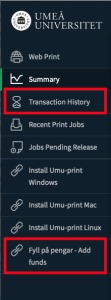
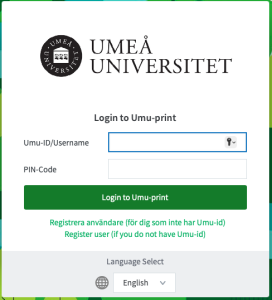
  1. Log in to https://print.umu.se:9192/app and click on “Add funds”.
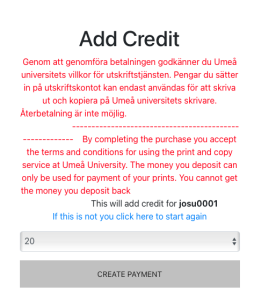
  2. Select the amount you want to deposit into your account.
  3. Fill in name and personal details.
  4. Fill in the card details and click “Pay”.
  5. Your transfer will appear as a balance in the printing system under “Transaction History”.
  6. Here you can see how much you topped up, current balance and your previous transaction history.
https://manual.umu.se/wp-content/uploads/2018/02/manual-loggo.png 0 0 Sofia Westerlund https://manual.umu.se/wp-content/uploads/2018/02/manual-loggo.png Sofia Westerlund2023-01-30 12:47:572026-01-23 11:18:54Add funds to Umu-print

Install Umu-print

2023-01-30/in Okategoriserade, Umu-print

This guide will help you install Umeå University’s printing solution Umu-print.

Read more
https://manual.umu.se/wp-content/uploads/2018/02/manual-loggo.png 0 0 Erik Öhman https://manual.umu.se/wp-content/uploads/2018/02/manual-loggo.png Erik Öhman2023-01-30 12:45:562026-04-07 13:23:11Install Umu-print

Web print – Umu-print

2023-01-30/in Umu-print
Read more
https://manual.umu.se/wp-content/uploads/2018/02/manual-loggo.png 0 0 Sofia Westerlund https://manual.umu.se/wp-content/uploads/2018/02/manual-loggo.png Sofia Westerlund2023-01-30 12:41:082026-01-20 09:21:29Web print – Umu-print

Contact ITS Service Desk

Create a support ticket at www.umu.se/servicedesk, call 090-786 63 00 or visit us next to Infocenter.

Kategorier

Scroll to top Scroll to top Scroll to top