
Engelska kategorin för studentinformation.
Clear cache files in your web browser
How to clear browser cache, cookies and history in Edge, Firefox, Chrome, Safari, Mobile Safari and Android.
Change or reset Password on Umu-id
Manual to help you reset your password.
Computer Labs
There are a few computers around the university that are open for all students to use. These belong to the University Librarys computer labs.
There is also a computer lab in the Medical Library (building 6M NUS)
All other computer labs are the responsibility of individual departments. Students of those respective departments have access to these labs. To have access to these labs requires that your UmU-card has the correct permissions. UmU-cards can be updated for permissions by the appropriate House Services department. The only exception is for the MIT-building which is administered by Study Administrators.
Booking group rooms at Universum
Booking
Universum has a few group rooms available that you as a student can book.
Group rooms are booked via the University library’s homepage.
To be able to see the booking page surf to http://www.ub.umu.se/en/booking
To be able to book a group room you need a student email to confirm your booking. If you need an email, contact Servicedesk.
Access after hours
Everyone that has a UmU-card at the university should automatically have access to group rooms at Universum after working hours. if this does not work for you, please contact House Services Department in order to gain access.
Questions?
For questions about group rooms, please contact the Library personal.
How do I get access to Microsofts developers tools?
Umeå universitet gives active students access to MS Azure Dev Tools for Teaching (has replaced MS Imagine), containing the most common development tools from Microsoft. The use is for scientific/technical studies or evaluation for this purpose. You will e.g. not get access to MS Office.
The Windows versions accessible through MS Azure Dev Tools for Teaching are there to facilitate access to use the development applications. Please note that MS Windows at MS Azure Dev Tools for Teaching is not allowed to be installed on a computer where there is no license for a full version of Windows.
See more information from Microsoft about MS Azure Dev Tools for Teaching:
https://azureforeducation.microsoft.com/en-us/Support/FAQ
Here you can reach MS Azure Dev Tools for Teaching:
https://aka.ms/devtoolsforteaching
As a doctoral student, teacher and researcher at Umeå University, you can also access MS Azure Dev Tools for Teaching if the software is only used in research and learning (non-commercial or productive purpose).
Logging in at Universityadmissions.se
You can log in to universityadmissions.se via Swedish Universities with help of your UMU-id.
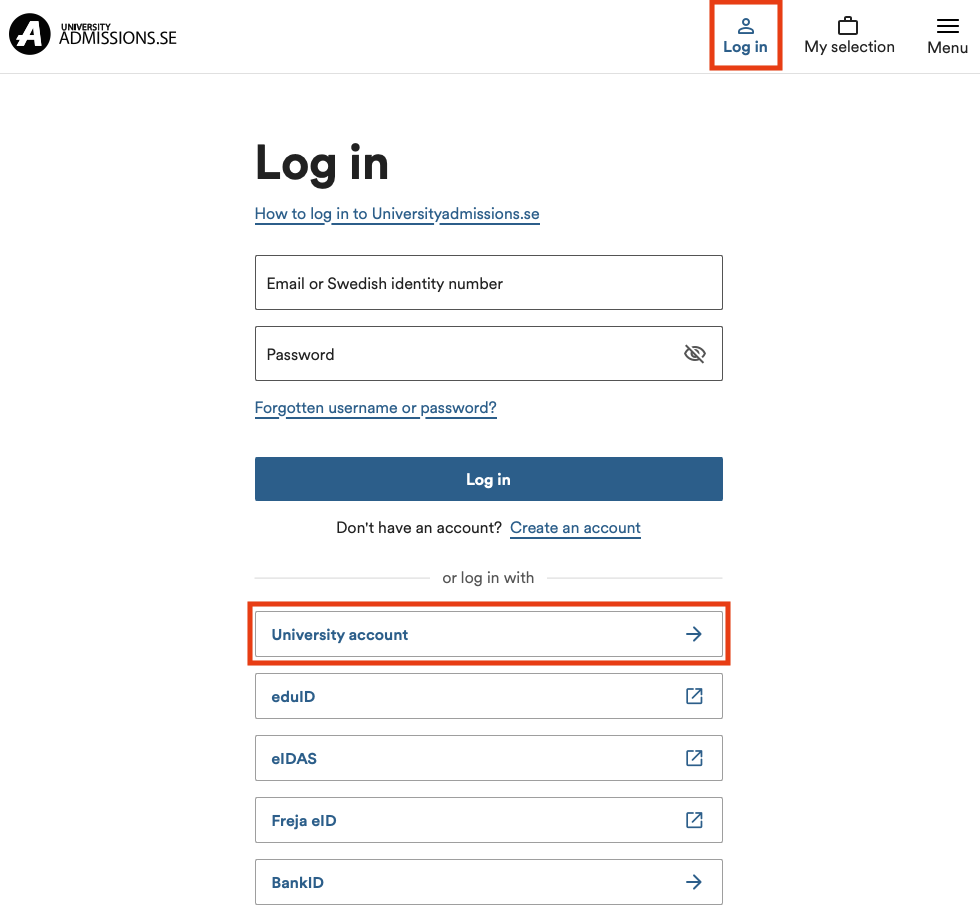
To login at universityadmissions.se do the following:
1. Go in to the website https://www.universityadmissions.se/intl/start and click on the Log in tab in the upper right.
2. Go to University account and select Umeå University from the drop down list and then click on To Student Portal.
3. You will be redirected to a login page where you are required to login with help of your UMU-id along with accompanying password.
If you don’t remember the password to your student mail
- You can request a new temporary identity via https://www.servicedesk.its.umu.se/Activation/Guide/
- The alternative is to visit us at Servicedesk (remember photo-ID) and get a new temporary identity direct.
I have not received any activation information. What do I do?
Information about methods to activate your Umu-id and other things related to your account at Umeå University.
What is UMU-id and why do I need it?
As a student or employee, you need an UMU-id to be able to log into most of the University’s systems and services, such as Canvas, Intranet and administrative systems.
- As a student, you will receive your UMU-id automatically when you are admitted to one of our courses.
- Employees receive your UMU-id when you are entered into the personnel system.
Your UMU-id consists of a username and a password. The username consists of 8 characters in a combination of letters and numbers. The letters are based on your first and last name while the numbers are a serial number.
Password to your UMU-id is something you set yourself. A password must be between 16-50 characters long and must contain 3 of the following 4 parameters: Capital letters, small letters, numbers, special characters (like * # ! & )
You use UMU-id to log in to most of the university’s central IT systems.